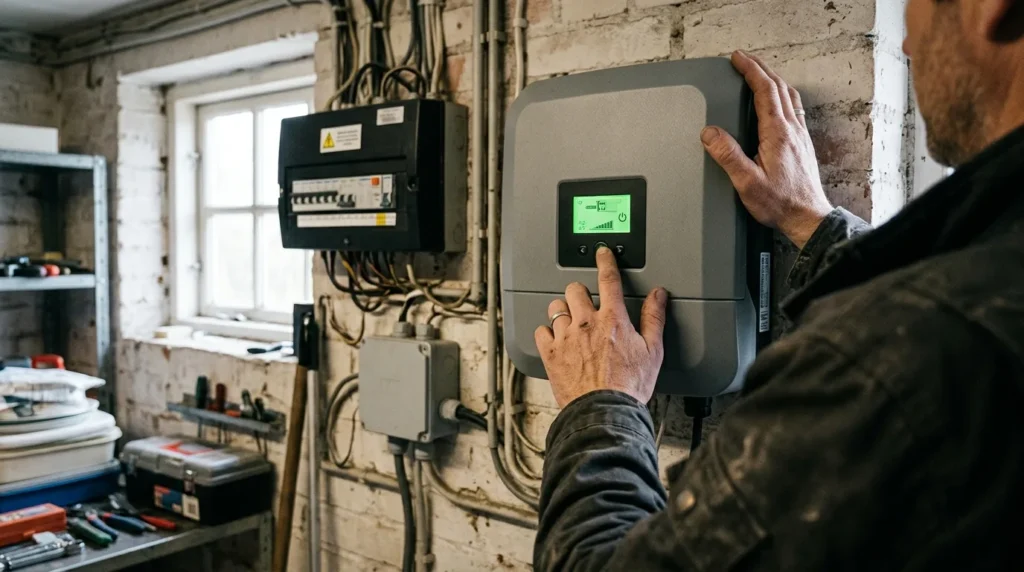
Solar PV systems are reliable — but they are not infallible. When something goes wrong, most Irish homeowners face the same challenge: the system is silent, the monitoring app shows a fault, and they don’t know where to start. This solar PV troubleshooting guide walks through the most common problems in order of likelihood, from the simplest fixes you can do yourself in two minutes to the faults that require a SEAI-registered professional.
Understanding Your System Before Diagnosing It
Before troubleshooting any fault, it helps to understand the basic flow of your solar PV system:
Energy flow: Solar panels → DC cables → inverter → AC wiring → consumer unit → your home (and grid when surplus).
Monitoring flow: Inverter → monitoring gateway (WiFi or Ethernet) → manufacturer’s cloud → your app (Fronius Solar.web, SolarEdge monitoring portal, Enphase Enlighten, Huawei FusionSolar, Sungrow iSolarCloud).
Key isolators:
- DC isolator (usually red, near the inverter): disconnects the solar panel DC circuit from the inverter
- AC isolator (usually grey or white, near the inverter or consumer unit): disconnects the inverter from the home’s AC circuit
- Generation meter: records your total solar output, separate from the ESB smart meter
Most faults appear in one of these three areas. Most self-resolvable faults are either isolator position, monitoring connection, or grid disturbance issues.
Fault Category 1: Zero Generation on a Sunny Day
This is the most alarming scenario — a clear, sunny day and the monitoring app showing zero output. Before calling anyone, work through this checklist:
Step 1: Check the DC Isolator Position
The DC isolator (typically a red rotary switch mounted near or adjacent to the inverter) must be in the ON (closed) position during daylight hours. It is sometimes inadvertently switched to OFF during other electrical work in the utility room or garage.
- Rotate to ON
- Wait 2–5 minutes for the inverter to restart and begin generating
- Check the inverter display for an operating status
This is the single most common cause of sudden zero generation. Many homeowners call installers about a fault that turns out to be an accidentally switched DC isolator.
Step 2: Check the AC Isolator
Similarly, the AC isolator between the inverter and consumer unit should be in the ON position. If it has tripped (some AC isolators have an MCB that can trip), reset it.
Step 3: Check the Inverter Display
All modern inverters have an LED indicator or LCD display showing operational status:
No central inverter — check Enlighten app
If the display shows an error code, note it exactly — this is essential for Step 6.
Step 4: Check for a Grid Outage
Solar PV inverters are required by law to disconnect from the grid during a power outage — this is an anti-islanding safety requirement protecting ESB Networks engineers working on the grid. If your neighbours are also without power, your solar system will correctly show zero generation.
Check: Are other appliances working? Do you have mains power?
If there’s been a brief grid disturbance (voltage spike, momentary outage) the inverter may have disconnected and is in “grid reconnection waiting period” — typically 90 seconds to 5 minutes. Wait 5–10 minutes before checking again.
Step 5: Check Monitoring Connectivity (vs Actual Generation)
It is possible your system is generating but the monitoring is not reporting it. The monitoring app connects via your home WiFi to the inverter’s monitoring gateway. If your WiFi is down, the monitoring data stops — but the system continues generating.
Check: Is your home broadband working? Has your router restarted recently (changing IP address)? Is the inverter monitoring gateway still connected to your router?
To confirm generation without monitoring: Read the generation meter directly (located near the consumer unit, usually a small white pulse-output meter). If the reading is increasing during daylight hours, the system is generating — you have a monitoring connectivity issue, not a system fault.
Step 6: Record the Inverter Error Code
If the inverter display shows an error code, look it up in the inverter’s manual (available on manufacturer websites). Common codes and their meanings:
Fronius (Primo/Symo GEN24):
- State 516 / ITAR — Grid voltage or frequency out of range; self-resolves when grid normalises
- State 102 — Waiting for grid connection (normal startup sequence)
- AFCI fault — Arc fault detected in DC wiring; requires professional inspection
- RCMU fault — Residual current detected; requires professional inspection
SolarEdge:
- Grid fault — Grid disturbance; usually self-resolves
- AC voltage too high/low — Grid quality issue; contact installer if persistent
- Isolation fault — Ground fault in DC wiring; requires immediate professional inspection
Huawei SUN2000:
- Alarm 2001 — DC overvoltage; check string configuration
- Alarm 1033 — Grid undervoltage; monitor for persistence
Sungrow:
- Grid over-frequency / under-frequency — Grid quality issue; usually transient
- Isolation resistance low — Ground fault; requires professional inspection
Key rule: Codes relating to grid disturbance (voltage, frequency) are usually transient and self-resolve. Codes relating to isolation faults, arc faults, or residual current are serious and require professional inspection — do not override or reset these.
Fault Category 2: Output Is Lower Than Expected
If the system is generating but output seems consistently low (not a sunny-day-versus-cloudy-day comparison), work through these checks:
Check 1: Confirm Your Expectations Are Realistic
Irish solar output is highly seasonal. A 4 kWp system produces approximately:
- June/July: 450–550 kWh/month
- December/January: 50–80 kWh/month
- Annual total: 3,200–3,800 kWh
If you’re comparing December output to June, the 80% reduction is normal. Compare month-to-month (December 2026 vs December 2025) rather than season-to-season.
Also check: Year-to-year weather variation in Ireland can cause ±10% output variation. A very cloudy summer will reduce output 8–12% versus a sunny year.
Check 2: Look for New Shading
Has anything changed in your environment that could shade the panels?
- A tree that has grown significantly
- A new structure (neighbour’s extension, satellite dish installation)
- An aerial or vent that has shifted position
- Debris accumulation in a valley between roof slopes
Even partial shading of one panel in a string can reduce the entire string’s output significantly without optimisers.
Check 3: Check for Soiling
In Ireland, significant output loss from soiling is uncommon due to frequent rainfall, but:
- Bird droppings — particularly common near water (rivers, coast, reservoirs), starling nesting areas, and under aerial cables
- Moss or lichen on panel frames or edges (rarely on glass)
- Extended dry spells (more than 3–4 weeks in summer) can allow light dust and pollen accumulation
Check visually from ground level. If panels are visibly dirty, arrange a professional clean before assuming a system fault.
Check 4: Compare Individual Panel Data
If you have Enphase (microinverter per panel), SolarEdge (power optimiser per panel), or Huawei Smart Energy (optimiser per panel), your monitoring portal shows output per individual panel. Look for:
- One or two panels consistently producing 30–50% less than adjacent panels → likely soiling, shading, or panel fault
- An entire string at 50–70% of expected output → likely string-level fault (inverter MPPT channel, string fuse, junction box issue)
- All panels uniformly 10–15% below expected → likely seasonal weather, string configuration issue, or systematic soiling
For standard string inverters without per-panel monitoring (some Fronius or Sungrow installations without optimisers), you cannot isolate individual panel performance without professional IV curve tracing.
Check 5: Review Historical Monitoring Data
Look at your monitoring portal’s historical data:
- When did the underperformance start? (gradual over months = panel degradation or growing shade; sudden drop = specific fault event)
- Is the drop on specific days/times? (morning low = east shading; afternoon low = west shading; all-day low = system fault or soiling)
- Does the power curve shape look normal (bell curve peaking at solar noon) or abnormal (flat top = clipping, erratic = intermittent fault)?
Fault Category 3: Inverter Faults and Error Codes
Transient vs Persistent Faults
Transient faults (self-resolving):
- Grid voltage/frequency events (typically last minutes, caused by grid disturbances)
- Temperature-related derating (inverter running hot in summer; will automatically throttle to protect itself)
- Communication timeouts between inverter and monitoring gateway
These self-resolve within minutes to hours. If the monitoring app shows historical fault events that have since cleared, no action is required unless they are recurring frequently (more than 2–3 times per week).
Persistent faults (require professional attention):
- Any isolation/ground fault code (indicates damaged DC insulation — potential fire hazard)
- Any AFCI/arc fault code (indicates arcing in DC circuit — potential fire hazard)
- Any code that has been present for more than 24 hours without clearing
- Any code causing zero generation that persists after checking isolator positions
Inverter Shutdown in Hot Weather
In Irish summers (July–August), inverters installed in poorly-ventilated south-facing utility rooms or hot attics can thermally derate. The inverter reduces output to protect itself:
- Symptoms: Output significantly below projection on very sunny days (particularly 2–4 pm when ambient temperature peaks)
- Fronius indicator: Output limiting visible in monitoring, possibly “Temperature derating” in event log
- Fix: Improve ventilation around the inverter; shade the inverter enclosure if in direct sun; or relocate (professional job)
Fault Category 4: Monitoring and Data Issues
Monitoring Showing Zero But System May Be Generating
Cause: WiFi dropout, router reboot (new DHCP address), monitoring gateway firmware issue, cloud server issue.
Self-fix steps:
- Restart the monitoring gateway (usually a separate small device connected to your router, or the inverter’s built-in WiFi module)
- Check your router settings — some routers reassign IP addresses after reboot, losing the inverter connection
- Check the manufacturer’s status page for cloud server issues (Fronius, SolarEdge, Enphase, Huawei all have status pages)
- Re-pair the monitoring gateway to your WiFi if your router/password has changed
Confirm actual generation: Check the generation meter reading directly. If it’s increasing, the system is working — only the monitoring is disconnected.
Generation Meter and Monitoring Data Discrepancy
If your generation meter reads significantly differently from what the monitoring portal reports (more than 2–3% discrepancy):
- Possible causes: Faulty CT clamp, monitoring gateway misconfiguration, metering fault
- Who to contact: Your installer — this is a technical diagnostic requiring equipment
For MSS claims, your ESB smart meter’s export reading is the source of truth for export payments, not your monitoring portal.
Fault Category 5: ESB Networks and Grid Issues
System Generating But No Export Credits Appearing
If your system is generating but your MSS export credits aren’t appearing on your bill:
Confirm MSS registration — have you registered with your electricity supplier (Electric Ireland, Energia, Bord Gáis Energy, SSE Airtricity) for the Clean Export Guarantee? This is a separate step after ESB Networks NC6 approval.
Confirm smart meter installation — your ESB smart meter must be configured for bidirectional measurement. Older meters don’t support export reading. If ESB Networks haven’t yet installed or upgraded your meter, export data isn’t being captured.
Check export reading on ESB smart meter — the smart meter has a display cycle; one reading shown will be your export total. Check it’s incrementing.
Contact your supplier’s solar team — if registration is confirmed and the meter is set up, billing queries go to the supplier’s MSS/CEG support team.
System Performance After NC6 and Smart Meter
Some homeowners notice different output behaviour after the smart meter is installed. This is normal — the smart meter doesn’t affect generation, but you may now be more aware of your export vs consumption pattern.
If you notice generation has dropped since the smart meter was installed, this is coincidence not causation — investigate for other causes (seasonal change, new shading, inverter fault).
When to Call a Professional
Call immediately (safety concern):
- Any isolation or ground fault code in the monitoring
- Any arc fault (AFCI) code
- Burning smell from the inverter or consumer unit area
- Inverter making unusual sounds (buzzing, crackling)
- Visible damage to panels or wiring
Call within a few days (system fault, non-emergency):
- Zero generation that persists after checking isolators and grid status
- Persistent error code that doesn’t clear after 24 hours
- Output more than 20% below expectation for more than 2–3 weeks (after ruling out weather and soiling)
- One panel consistently 40%+ below adjacent panels (possible cell failure)
Call when convenient (monitoring and admin issues):
- Monitoring connection issues (system may still be generating)
- Generation meter vs monitoring portal discrepancy
- MSS registration and billing queries
Making a Warranty Claim in Ireland
If a professional diagnosis confirms a panel or inverter fault:
Panel warranty claim process:
- Obtain written fault confirmation from your installer (IV curve trace result, thermal image showing hot spot)
- Contact the panel manufacturer’s Irish or UK distributor (or European headquarters) with your panel serial numbers, purchase date, and fault evidence
- Panel manufacturers include: Longi (UK office), Canadian Solar (German EU office), JA Solar, Jinko Solar, REC Group, Panasonic
- The installer should assist with this process — this is their professional responsibility
Inverter warranty claim process:
- Fronius — Irish distributor is Fronius Ireland Ltd; warranty claims through installer or directly via Fronius eService
- SolarEdge — UK office handles Ireland; RMA process through installer
- Huawei FusionSolar — Irish warranty through installer to Huawei Energy distributor
- Enphase — EU warranty process via Enphase; 25-year IQ8 warranty is manufacturer-backed
Under the Consumer Rights Act 2022, you have statutory rights against your installer for defective installation work for up to 6 years. If a fault is attributable to poor installation (incorrect wiring, improper waterproofing causing cable ingress, undersized components), your installer is legally responsible.
If your installer has gone out of business:
- Contact the panel manufacturer directly with proof of purchase
- Contact the inverter manufacturer directly
- For installation defect claims with an insolvent installer, consult SEAI (who maintain the registered installer scheme) and consider the Small Claims Court for claims up to €2,000
Preventive Measures: Reducing Future Faults
The best troubleshooting is prevention:
Set up monitoring alerts — all major inverter brands allow email or push notification alerts for fault conditions. Configure these at installation.
Annual visual inspection — check from ground level in spring and autumn. Look for visible damage, displaced panels, or heavy soiling.
Review monitoring data monthly — compare to previous year’s same month. Investigate anything more than 15% below expectation.
Keep installation documentation — retain your SEAI grant paperwork, inverter manual, panel spec sheets, and generation meter serial number. These are needed for warranty claims.
5-year professional inspection — every 5 years, a professional inspection with thermal imaging will identify developing issues (hot spots, degrading junction boxes, corroding mounting hardware) before they become significant faults.
Quick Fault Reference Table
Zero generation, sunny day
Switch DC isolator ON; wait 5 min
Grid outage or disturbance
Check neighbours; wait 15 min
Note code; look up in manual
Ground fault in DC circuit
Call installer immediately
Output 50% low, one string
String fuse, junction box
Bird dropping or cell fault
Clean panel; if persists, call installer
WiFi/monitoring disconnected
Restart gateway; check meter directly
Contact supplier's solar team
Inverter hot, output derated
Improve ventilation around inverter
Output 10% below projection
Normal seasonal variation
Compare same month previous year